As an Amazon Associate, we earn from qualifying purchases. Some links on this site are affiliate links at no extra cost to you. Our recommendations are based on thorough research and editorial judgment.


OTG Adapters: Expanding Phone Functionality With USB Devices

USB On-The-Go (OTG) adapters enable mobile devices to connect directly to USB peripherals, such as flash drives and keyboards. These compact devices support data transfer without needing a computer. OTG adapters typically feature micro USB and USB-C connectors, enhancing compatibility across various smartphones and tablets. Users can easily manage files and access additional storage. Proper selection guarantees functionality, while maintenance tips can extend lifespan. Interested users should explore the vast applications and benefits of OTG technology further.
Key Takeaways
- OTG adapters enable mobile devices to connect directly to USB peripherals, enhancing functionality and productivity without a computer.
- They support a variety of connections, including USB flash drives, keyboards, and mice, streamlining data transfer and task execution.
- With plug-and-play functionality, OTG adapters require no additional software or power, making them easy to use on the go.
- Compact and lightweight, these adapters are portable, allowing users to expand their device capabilities anywhere.
- Compatibility with both USB-C and micro USB ensures that OTG adapters work with a wide range of devices, maximizing usability.
What Is a USB On-The-Go (OTG) Adapter?
You may be interested


A USB On-The-Go (OTG) adapter serves as a pivotal accessory for modern mobile devices, transforming how users interact with their smartphones and tablets. This small device allows for a direct connection between mobile devices and various USB devices. Examples include keyboards, flash drives, and mice. By utilizing USB OTG functionality, tablets and smartphones can fundamentally act as hosts, allowing easy data transfer without the need for a computer. OTG adapters come in different types, primarily micro USB and USB-C, catering to both older and newer devices. Users can enhance productivity by managing additional storage or directly accessing files from cameras. The simplicity and versatility of OTG adapters make them essential tools for anyone looking to expand their mobile device capabilities. A 2-in-1 Headphone and Charger Adapter allows simultaneous charging up to 60W while enhancing audio performance, showcasing how USB-C technology expands device functionality.
How Does a USB OTG Adapter Work?

How does a USB OTG adapter functionally transform mobile devices into versatile hosts? The USB OTG adapter allows smartphones or tablets to function as a host device when connected to peripheral devices like flash drives or keyboards. Upon insertion, the adapter initiates data transfer by establishing a communication link using the Attach Detection Protocol (ADP). This detects the connected device and powers the bus appropriately. The USB OTG functionality enables mobile devices to carry out tasks, formerly reliant on a computer, such as file transfers or device connections. USB Type-C connections enhance this capability through quick role negotiation via Configuration Channel (CC) pins, improving OTG compatibility and streamlining user experiences across a range of applications and devices. Device compatibility is crucial, as not all devices support OTG, requiring users to verify their device’s specifications to ensure functionality.
Key Features of OTG Adapters

USB OTG adapters boast several key features that substantially enhance mobile device functionality. These adapters create direct connections between a mobile device and USB devices, allowing users to transfer files efficiently. The OTG Adapter Cable often includes both USB C and Micro USB connectors, ensuring universal compatibility across multiple devices, such as Amazon Kindle and Google tablets. With a compact design (6.1 x 3.27 x 0.28 inches) and a lightweight build (only 0.317 ounces), these adapters are highly portable, perfect for on-the-go use. Their plug-and-play functionality negates the need for additional software, making setup easy. Rated 4.2 out of 5 stars, they are well-regarded for reliability and ease of connection with accessories like keyboards or external hard drives. Most OTG adapter cables do not require additional power sources, making them convenient for users who want seamless connectivity without the need for external power.
How to Choose the Right OTG Adapter

Choosing the right OTG adapter is essential for maximizing device functionality. First, identify your device’s port type—either USB-C or micro USB OTG—confirming compatibility with your chosen USB adapter. Additionally, check for OTG support in your device’s manual or through compatibility apps. When selecting an adapter, consider cable length. Shorter cables provide superior portability, while longer lengths offer flexibility in device placement. High-quality materials are significant; durable adapters withstand frequent use and guarantee reliable performance. Moreover, look for plug-and-play convenience—this feature allows for immediate use without requiring software or drivers. USB-C OTG adapters feature a reversible design, allowing them to be plugged in either way, simplifying connections and minimizing frustration, especially in low-light situations. By paying attention to these details, users can effectively enhance their mobile experience and access the full potential of their USB OTG (On-The-Go) capabilities.
OTG Adapter Compatibility With Devices
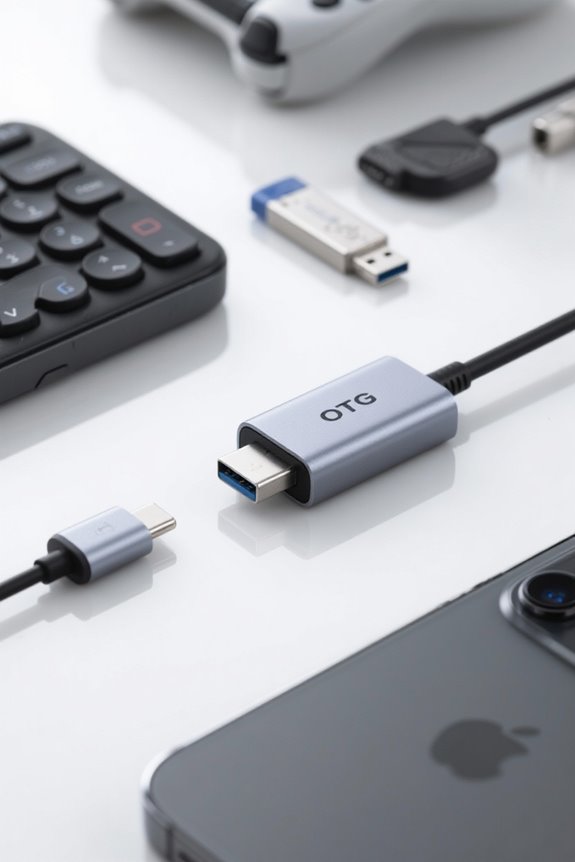
The compatibility of an OTG adapter with various devices plays an essential role in enhancing mobile functionality. Master Cables Universal OTG adapters are designed to connect USB devices seamlessly. They feature both USB C and Micro USB connectors, ensuring compatibility with multiple devices, including all models of Amazon Kindle, Amazon Fire, Google, and Samsung tablets and phones. This USB OTG device enables users to connect peripherals like USB flash drives, mice, keyboards, and external hard drives effortlessly. No extra software is needed for operation; plug-and-play functionality simplifies use. Users have reported successful performance with popular devices such as the Samsung Galaxy S5 and Google Nexus 7, underlining the adapter’s versatility and reliability within the OTG landscape. A key consideration for these adapters is ensuring device compatibility with charging protocols like Power Delivery (PD) and Quick Charge (QC) to further enhance their utility.
Common Uses of OTG Adapters
While many mobile users may not realize it, OTG adapters reveal a range of functionalities that can greatly enhance their experience. USB OTG (On-The-Go) allows users to connect USB flash drives directly to their smartphones and tablets. This supports easy file transfers and additional storage. Furthermore, connecting external hard drives enables the transfer of large files or backups without needing a computer. Users can also connect USB keyboards and mice, which greatly boosts productivity by facilitating efficient typing and navigation. For photographers, OTG adapters enable direct communication with cameras, allowing seamless photo transfers. Additionally, users can connect USB hubs to utilize multiple USB devices simultaneously, increasing the versatility of their mobile device usage. Environmental and Health Applications are also enhanced by using OTG adapters, as they allow connectivity with smart thermometers for precise temperature monitoring and data analysis.
Connecting USB Devices to Your Mobile Device
OTG adapters open the door to a multitude of USB device connections that greatly enhance a mobile device’s capabilities. With USB OTG (On-The-Go), users can connect USB-C and Micro USB devices seamlessly. This compact Master Cables OTG adapter is perfect for linking peripheral devices such as keyboards, mice, or flash drives directly to smartphones and tablets. It allows quick access to storage and makes transferring files effortless. Its dimensions of 6.1 x 3.27 x 0.28 inches and lightweight design (only 0.317 ounces) enable it to be easily carried anywhere. The ability to use multiple USB devices simultaneously optimizes productivity for both personal and professional needs, demonstrating the adapter’s reliability, as evidenced by its 4.2 out of 5 customer rating. When choosing an OTG adapter, it’s important to consider compatibility with multiple operating systems to ensure seamless integration with various devices.
Transfer Data Seamlessly With OTG Adapters
Enhancing mobile productivity has never been easier, thanks to the versatility of OTG adapters. USB OTG (On-The-Go) technology enables users to connect various devices, such as flash drives and external hard drives, directly to their smartphones. This functionality allows for seamless data transfers, eliminating the need for a computer. With plug-and-play capabilities, users can quickly connect peripherals without installing additional software. Most OTG adapters accommodate Micro USB and USB-C connections, making them versatile options for devices like the Samsung Galaxy S5 and Google Nexus 7. This flexibility is particularly beneficial for photographers and content creators who need to transfer large files efficiently while on the go, showcasing OTG adapters as essential tools for modern mobile workflows. Durability through features like aluminum housing and braided designs ensures that OTG adapters can withstand wear and tear during use, similar to the robust designs seen in USB-C to HDMI cables.
Enhancing Productivity With OTG Technology
A plethora of devices can be connected to smartphones and tablets using USB On-The-Go (OTG) adapters, which enter the domain of productivity enhancement. This technology includes options for connecting multiple peripherals, such as thumb drives and external hard drives. The Master Cables Universal OTG Adapter features both USB C and Micro USB connectors, ensuring compatibility with various devices. With a compact design, it easily fits into pockets, making it a must-have accessory for users on the go. The plug-and-play functionality simplifies usage—no additional software is needed. Users appreciate that USB OTG facilitates tasks from data transfers to greater peripheral control, considerably amplifying their mobile device’s utility for both personal and professional purposes. Most adapters support rapid charging, with rates ranging from 2.4A to 3A, ensuring quick power solutions and efficient data transfers.
Frequently Asked Questions About OTG Adapters
What essential details should users consider when exploring OTG adapters? First and foremost, users must verify their device supports USB OTG functionality. Not all smartphones or tablets possess this capability. A successful connection enables plug-and-play functionality—meaning immediate use without additional software. Additionally, many USB OTG adapters accommodate various USB ports, including USB-C and Micro USB, allowing for versatile connections with peripherals like flash drives and mice. Users can enhance productivity considerably, enabling direct file transfers and access to external devices right from their devices. Before purchasing, double-check compatibility to confirm peak performance. Finally, it’s wise to inquire about data transfer speeds, as these can vary between different adapters, impacting overall efficiency. For those traveling internationally, it’s beneficial to consider universal compatibility with various plug types to ensure seamless connectivity across different countries.
Tips for Maintaining Your OTG Adapter
Maintaining the longevity and performance of an OTG adapter is essential for ensuring consistent functionality. To preserve these vital devices, always store OTG adapters in a protective case or pouch, minimizing physical damage risks. Regularly inspect the connectors for dirt or debris. Cleaning them gently with a soft cloth helps maintain ideal connectivity with USB devices. Refrain from bending or twisting the cable excessively; sharp bends can cause internal breakage. Additionally, keep the adapter away from extreme temperatures and moisture to prevent material degradation. When disconnecting an OTG adapter, practice proper ejecting to safeguard against potential data loss or corruption. By following these tips, users can extend the life and effectiveness of their OTG adapters greatly.
Frequently Asked Questions
What Does a USB OTG Adapter Do?
A USB OTG adapter facilitates data transfer between compatible devices, supports various peripherals, provides power delivery, and enhances functionality. Users can also connect gaming accessories, optimizing mobile experiences for productivity and entertainment purposes.
What Is the OTG Function on My Phone?
What if one’s phone could connect seamlessly to external devices? The OTG function enables this, allowing diverse connections and applications, though users may face OTG compatibility issues, require specific cable types, and utilize troubleshooting tips for ideal performance.
What Is the Difference Between USB and OTG USB?
The USB standards comparison highlights that OTG enables direct connections between devices, requiring OTG device compatibility. Differences include power consumption rates and increased data transfer rates, allowing USB peripherals usage via OTG adapters for enhanced functionality.
Is OTG Good for Phones?
OTG is beneficial for phones, enhancing compatibility with popular devices while providing fast data transfer. Using OTG safely allows for efficient operation, though troubleshooting issues may arise, ensuring users maximize their experience with these adapters.


