As an Amazon Associate, we earn from qualifying purchases. Some links on this site are affiliate links at no extra cost to you. Our recommendations are based on thorough research and editorial judgment.


Mobile Gimbal Stabilizers: Video Recording Enhancement Technology

Mobile gimbal stabilizers improve video quality by employing advanced motorized systems. These devices counteract shakes and vibrations, ensuring smooth footage across different filming scenarios. For instance, the DJI Osmo Mobile 7P supports smartphones up to 3.2 inches wide and features motion timelapse and subject tracking. Meanwhile, the Insta360 Flow 2 excels in intelligent tracking and includes a built-in tripod for stability. Users can enhance creative filming methods, making gimbals a must-have tool in videography. Keep exploring to uncover more options and insights.
Key Takeaways
- Gimbals use advanced motorized systems and sensors to stabilize video footage, significantly reducing shakiness during recording.
- They counteract hand movements through multiple axes, ensuring smooth and professional-looking videos.
- Gimbals enhance low-light performance by allowing slower shutter speeds, which minimizes motion blur.
- Many gimbals feature intelligent tracking, enabling automatic following of subjects for dynamic filming.
- Compatibility with dedicated apps expands functionality, often adding features like AI tracking and motion timelapse.
Best Smartphone Gimbal Overall
You may be interested


When considering mobile gimbal stabilizers, the DJI Osmo Mobile 7P stands out as the best overall smartphone gimbal, thanks to its impressive array of features and user-friendly design. Weighing just 340 grams and measuring 276 x 111 x 59 mm when folded, it’s highly portable. The gimbal supports smartphones up to 3.2 inches wide, making it versatile for various devices. With advanced features like motion timelapse, subject tracking, and an analog zoom/focus wheel, users can achieve high-quality video production. The DJI Mimo app enhances creativity, revealing additional functions. Furthermore, the design effectively minimizes hand tremors, providing smooth footage. However, users should note that some bulky phone cases may pose compatibility challenges. Overall, it’s a top choice for video enthusiasts. Additionally, 3-axis stabilization delivers smooth footage by reducing shake during dynamic movements, crucial for high-quality video production.
Best Smartphone Gimbal for Tracking
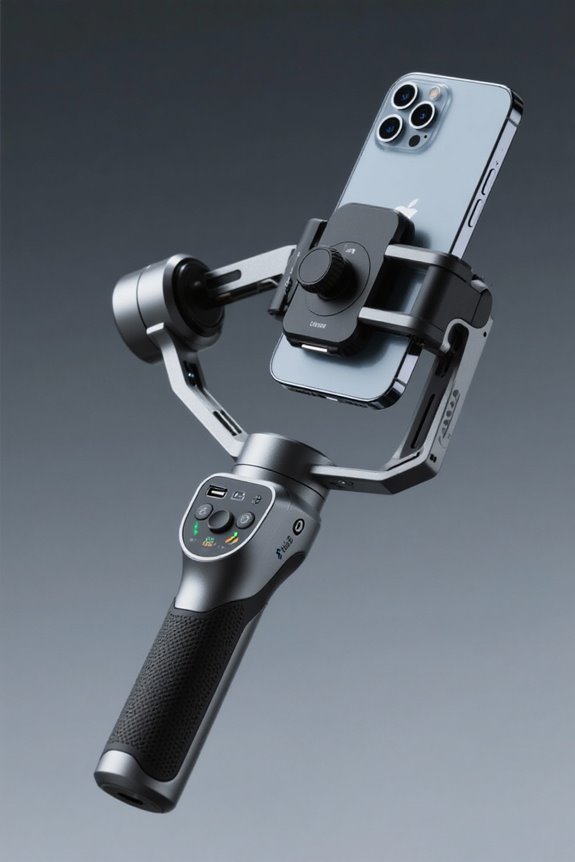
The pursuit of stability in videography takes a new form with the Insta360 Flow 2 Pro, acclaimed as the leading smartphone gimbal for tracking. This innovative device features AI-powered technology, delivering seamless 360-degree panning during dynamic shots. With a lightweight design at just 246g, it accommodates smartphones measuring between 50 to 90mm wide, providing portability for on-the-go creators. Its battery life of approximately 5.5 hours guarantees extended operation, making it an effective solution for active shooting scenarios. Additionally, the built-in tripod enhances stability for stationary purposes. The gimbal excels in intelligent tracking, smoothly following subjects for professional-looking videos. This makes it an indispensable tool for videographers aiming to capture impressive, fluid visuals in motion. For those frequently on the move, it’s important to consider compact mini power banks as essential companions, ensuring your devices remain powered throughout shooting sessions.
Best Smartphone Gimbal for Beginners

For aspiring videographers enthusiastic to create high-quality content, the Insta360 Flow 2 stands out as the best smartphone gimbal for beginners. Weighing a mere 373g, it offers remarkable ease of use. Setup is straightforward, complemented by a user-friendly interface. The gimbal is compatible with most smartphones (64-84mm wide and 6-10mm thick) and provides effective AI tracking, simplifying smooth filming for those without advanced skills. Its compact design includes a built-in mini tripod, enhancing versatility in various shooting scenarios. However, it is important to note that beginners might encounter limitations, particularly with native iOS Camera app tracking. Exploring alternative apps may be necessary to maximize the gimbal’s full capabilities and potential filmmaking experience. For those seeking additional stability, considering non-slip pads for uneven surfaces can enhance the filming experience.
Key Considerations for Gimbal Selection

Selecting the right gimbal involves careful evaluation of several key factors. First, compatibility with a smartphone’s dimensions and weight is vital, meaning it can’t support devices that are too large or heavy. Next, battery life must be assessed; longer shooting sessions require a durable battery for continuous operation. Users should also consider features like AI tracking and built-in tripods, as these enhance usability considerably. However, balancing feature desires against budget constraints is essential for achieving the best value. Finally, testing stabilization effectiveness, control accessibility, and companion app integration can dramatically impact user experience, ensuring that the chosen gimbal not only meets basic needs but also elevates video recording capabilities. Each factor contributes to an informed selection process. Consider ergonomic designs that reduce hand fatigue during extended use, as they play an essential role in improving the user experience for both beginners and professionals.
How Smartphone Gimbals Work and Their Benefits
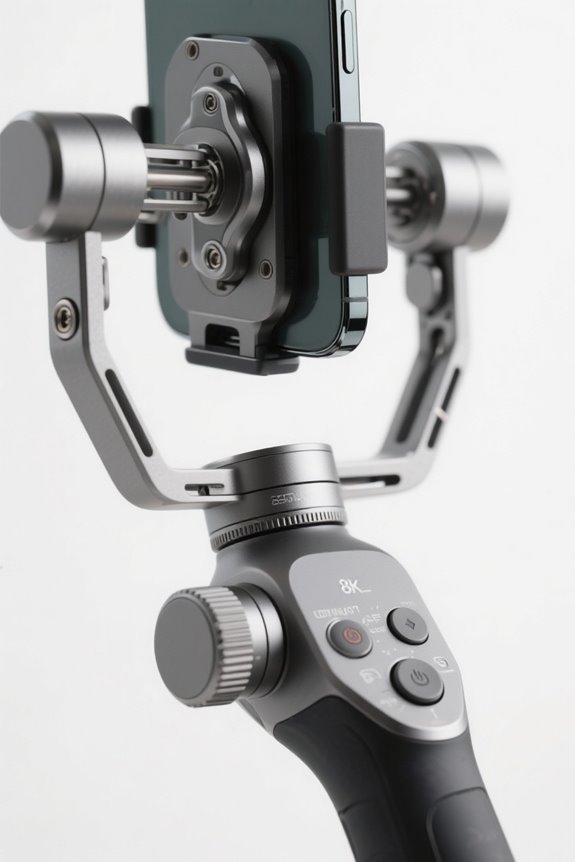
Although many might be unaware, smartphone gimbals function through advanced motorized systems combined with sensors designed to stabilize video footage. These gimbal mechanics counteract shakes by using multiple axes, leading to smooth and professional-looking recordings. Users can achieve dynamic shots without unwanted jitters, even when in motion. Gimbals enhance low-light shooting, allowing slower shutter speeds to reduce motion blur and produce clearer images. Additionally, they enable smooth panning, tilting, and tracking of moving subjects, offering a creative edge in filming. Many models are also compatible with dedicated apps, which add features like AI tracking and motion timelapse. This integration effectively broadens functionality, making gimbals an essential tool for aspiring videographers and content creators alike. When selecting a smartphone gimbal, consider factors like accessory compatibility to ensure it can accommodate additional filming tools such as microphones and lights.
Frequently Asked Questions
Can a Phone Gimbal Improve Video Quality?
In a world where shaky hands ruin epic moments, gimbals emerge as heroes. They effortlessly transform amateur recordings into video enhancement masterpieces, making cinematic quality accessible, while simultaneously making viewers question their own shaky existence.
What’s the Difference Between a Gimbal and a Stabilizer?
A gimbal utilizes advanced mechanics, featuring motorized stabilization across multiple axes, while traditional stabilizers rely on mechanical counterweights. This distinction allows gimbals to adapt better in dynamic situations, offering superior stability and versatility for videographers.
What Is the Best Phone Gimbal Stabilizer?
Which gimbal offers the best features for smartphone stabilization? The DJI Osmo Mobile 7P stands out with its advanced gimbal features, including subject tracking and motion timelapse, making it an ideal choice for videographers.
What Are the Disadvantages of a Gimbal?
Gimbal limitations include bulkiness and weight, potential obstruction of smartphone components, varying battery life, compatibility issues with cases, and a learning curve for controls. These factors can hinder effective and convenient use during filming.