As an Amazon Associate, we earn from qualifying purchases. Some links on this site are affiliate links at no extra cost to you. Our recommendations are based on thorough research and editorial judgment.


Why Screen Protectors Yellow Over Time and How to Prevent It

Screen protectors yellow over time due to exposure to UV light, heat, and chemical degradation. UV rays cause a chemical reaction in materials, leading to discoloration. Similarly, high temperatures accelerate material breakdown and weaken adhesive bonds. Common cleaning mistakes, such as using harsh chemicals or excessive moisture, can worsen yellowing. To prevent this, choose high-quality, UV-resistant protectors, store them in cool environments, and replace them every 6 to 12 months. Discover more methods to extend the lifespan of your screen protector.
Key Takeaways
- Prolonged UV light exposure and oxidation lead to yellowing in screen protectors due to chemical reactions in their materials.
- High temperatures accelerate material degradation and weaken adhesive properties, resulting in faster discoloration.
- Dust, heat, and humidity can trap UV rays, increasing the risk of yellowing over time.
- Using harsh cleaners or abrasive scrubbing can damage protectors, making them more prone to discoloration.
- Choose high-quality, UV-resistant screen protectors and replace them every 6 to 12 months for optimal performance.
Why Do Screen Protectors Turn Yellow?

You may be interested


Screen protectors, often seen as an invisible shield guarding valuable devices, can unfortunately turn yellow over time. This yellowing occurs primarily due to oxidation, a process triggered by prolonged UV light exposure. Environmental factors, such as heat and pollutants, exacerbate material degradation, particularly in lower-quality screens made from thinner materials. The organic dye layers in these screens break down faster under heat and UV exposure, resulting in noticeable discoloration. Additionally, high brightness settings can escalate this oxidation, raising temperatures and quickening the yellowing process, especially in devices over five years old. Dust accumulation can further trap heat and UV rays, accelerating deterioration. Regular cleaning with appropriate agents and using UV-blocking screen protectors can help mitigate yellowing, preserving the protector’s clarity. To further prevent yellowing, consider opting for screen protectors like those made from aluminosilicate glass, which offer enhanced durability and resistance to environmental factors.
The Role of UV Light in Yellowing
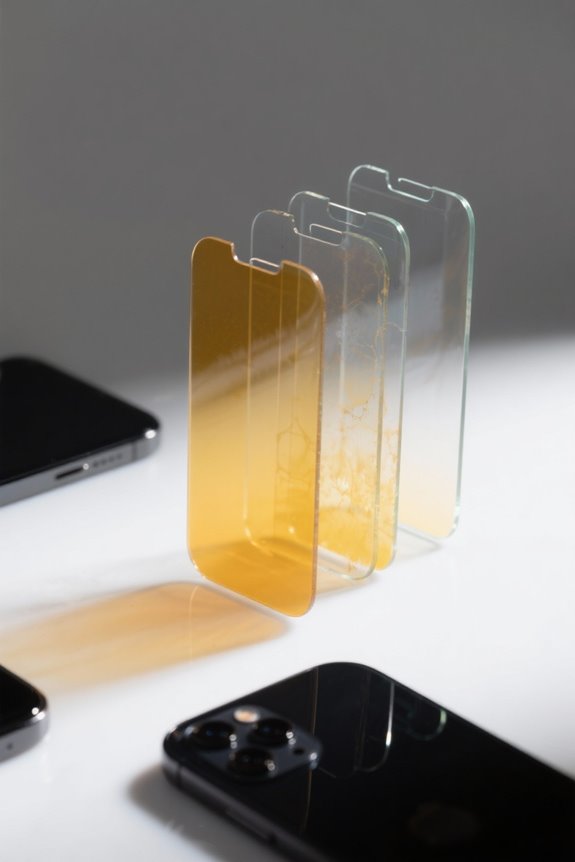
Ultraviolet (UV) light plays a pivotal role in the yellowing of screen protectors, contributing greatly to their overall degradation. When screen protectors are subjected to UV exposure, yellowing starts through a chemical reaction that impacts the material’s molecular structure. This extended exposure accelerates material breakdown, resulting in discoloration and diminished visual quality over time. Older backlight technologies, such as CCFL, emit more UV light, exacerbating the yellowing effects compared to modern LED screens. To combat this issue, the use of UV-blocking screen protectors is highly recommended, as they greatly prolong the lifespan and clarity of screens. Investing in quality protectors can pay off, preserving the original vibrancy and accuracy of the display while minimizing damage from harmful light rays. For optimal protection, consider using a 9H hardness screen protector, which offers superior resistance to scratches and environmental factors, ensuring long-lasting clarity and functionality.
Impact of Heat on Screen Protector Longevity

The impact of heat on the longevity of screen protectors is considerable and often underestimated. Heat exposure accelerates material degradation, increasing yellowing rates markedly. Research shows that higher temperatures, especially those above 35°C, can boost binder degradation by approximately 11% for every 5°C rise. Prolonged heat weakens adhesive properties, leading to poor adhesion and enhanced yellowing. Devices like smartphones and tablets are particularly susceptible, as internal components, such as CPUs and backlights, generate heat that causes uneven yellowing near these hotspots. Additionally, when humidity exceeds 60% RH, the combined effect of heat can further weaken adhesives, exacerbating yellowing. Understanding these factors can help users maintain clearer, longer-lasting screen protection. Many self-healing screen protectors utilize advanced TPU materials that offer elasticity and scratch resistance, which can help mitigate some effects of heat and maintain screen clarity over time.
Chemical Aging and Material Degradation

Chemical aging considerably impacts the appearance and performance of screen protectors, leading to a common issue: yellowing over time. This process occurs primarily due to oxidation resulting from exposure to air and UV light. Materials like TPU (thermoplastic polyurethane) are particularly vulnerable, as their chemical composition can react negatively with heat and environmental factors. The degradation of organic dye layers accelerates yellowing, especially under high temperatures and humidity. Budget options often have thinner layers and unstable adhesives, which exacerbate material degradation. Additionally, regular cleaning is essential; oils and dirt can hasten discoloration, while prolonged UV light exposure contributes further. Consequently, understanding these elements can help users maintain screen protector integrity and longevity. Some high-end screen protectors, such as those with oleophobic coatings, can help reduce fingerprints and smudges, potentially slowing down the yellowing process.
Common Cleaning Mistakes That Accelerate Yellowing

How can common cleaning practices inadvertently contribute to the yellowing of screen protectors? Often, users rely on harsh cleaning agents like bleach or acetone, which can weaken the materials, leading to accelerated yellowing. Furthermore, scrubbing with abrasives creates micro-scratches, allowing dirt to accumulate, further exacerbating the discoloration over time. Neglecting to clean regularly can lead to a buildup of oils, making the situation worse. Excessive moisture during cleaning can deteriorate the adhesive quality, hastening degradation. Additionally, using high temperatures or boiling water can warp the structure of the screen protector, enhancing yellowing from heat exposure. By understanding these common mistakes, users can better maintain their screen protectors and extend their lifespan, preventing unwanted discoloration. It’s also important to consider using screen protectors with anti-yellowing properties, which are designed to resist discoloration and maintain clarity over time.
How to Properly Clean Your Screen Protector
Maintaining the clarity of a screen protector requires more than simply applying a cloth; it involves a systematic approach to cleaning that safeguards against yellowing and damage. To clean your screen protector effectively, create a gentle solution using mild dish soap and warm water, applying it with a soft cloth to avoid scratches. For tougher stains and oils, rubbing alcohol can be utilized safely, ensuring the materials remain intact. It’s imperative to avoid using harsh chemicals like bleach or acetone as they may degrade the adhesive. Regular cleaning every 1 to 2 weeks helps preserve the clarity of your phone’s display and appreciably reduces dirt and oil buildup, promoting the longevity of your investments. Finish by gently drying with a microfiber cloth. Tempered glass protectors generally have a longer lifespan compared to plastic ones and should not interfere with wireless charging.
Signs of a Yellowing Screen Protector
Yellowing is a common issue that affects screen protectors, greatly impairing display quality. This discoloration can lead to reduced visual quality, diminishing color accuracy by 25–40%. Signs of a yellowing screen protector include a noticeable tint, generally added by UV rays or environmental exposure, indicative of material degradation. Such yellowing can increase eye strain, disrupting the balance of blue light emission vital for regulating sleep cycles. Additionally, a markedly yellowed protector may block essential blue wavelengths, impacting overall well-being. Regular visual checks for this yellowing are important, as they help determine the need for replacement. Remember, a compromised protector not only affects aesthetics but also diminishes its protective capabilities, raising concerns about screen safety. High-level privacy shields sensitive information from prying eyes, ideal for public use.
Choosing High-Quality Screen Protectors
Investing in a high-quality screen protector can greatly enhance the longevity and appearance of a device’s display. When choosing screen protectors, focus on materials such as tempered glass or high-grade polycarbonate, which resist yellowing and chemical degradation over time. Opt for products featuring UV-resistant coatings, as these can help remarkably reduce yellowing caused by ultraviolet exposure. Additionally, consider screen protectors with anti-yellowing coatings or advanced technologies that improve both durability and clarity for long-term usability. Checking for manufacturer guarantees is essential, as these confirm the quality of materials used and provide protection against premature yellowing. By staying informed on the latest innovations and reading product reviews, users can make educated choices for effective yellowing prevention. It’s important to consider tempered glass protectors with 9H hardness for superior scratch resistance and longevity in everyday use.
Recommended Products
![JUESHITUO 3 in 1 for Samsung Galaxy S25 Ultra Case, [Non-Yellowing] 360° Rotatable Magnetic Ring Stand with [1X Screen Protector] S25 Ultra Phone Cover, Clear](https://m.media-amazon.com/images/I/41u6g4BEMqL._SL500_.jpg)
Perfect Fit & Protection: Designed exclusively for your Samsung Galaxy S25 Ultra Case. Features military-grade drop protection with shock-absorbing corners & raised edges to safeguard your screen and camera. Includes a premium 9H tempered glass screen protector

[EV Golf Cart 9'' Screen Protector]: with black border, left-side printed buttons and pre-cut holes, especially designed for Ev golf cart display screen, or modified screen for golfers men own others. Check picture-2 size and design before purchase

Perfect Fit Guaranteed For Nikon D7500, No Gaps, No Guesswork - Laser-measured camera screen protector with a rigid clip-on frame ensures full coverage and zero adhesive residue, eliminating frustration from ill-fitting protectors that leave edges exposed
Benefits of UV-Resistant Screen Protectors
A UV-resistant screen protector serves as an essential defense against harmful ultraviolet light, a primary contributor to screen degradation. By blocking UV rays, these protectors greatly slow the yellowing process, preserving the clarity and color accuracy of the display. Many UV-resistant options feature specialized coatings designed to enhance durability, effectively reducing degradation caused by environmental stressors, such as sunlight and humidity. Moreover, by minimizing oxidative reactions, they help extend the lifespan of the device’s screen. This protective layer not only improves the visual quality but also reduces eye strain associated with yellowed screens, offering users a clearer and more enjoyable viewing experience. Investing in UV-resistant protectors is a wise decision for those seeking long-term device maintenance. Additionally, incorporating blue light filtering capabilities into screen protectors can further reduce eye strain and enhance viewing comfort.
Recommended Products

This Canon EOS 5d Mark IV Camera Bundle comes complete with all Canon Supplied Accessories

This Camera Bundle Kit comes complete with in box manufacturer supplied accessories as well as bundles accessories. It includes 1 Year Seller Supplied Warranty.

🏡Cedar Wood' Nature Beauty- Introducing the upgraded Domi gazebo series, now featuring a cedar wood frame! The cedar wood gazebos have warm, rich tones and a distinctive grain pattern that adds character to any outdoor space.
Frequency of Replacement for Optimal Protection
Regularly replacing screen protectors is vital for maintaining peak device protection and visual clarity. It is generally recommended to replace these protectors every 6 months to 1 year. Over time, factors like minor scratches, dirt accumulation, and the aging process contribute to their reduced effectiveness. While high-quality screen protectors can last 1-2 years with proper maintenance, visible wear or yellowing is a sign that earlier replacement may be needed. Visual checks are important; spotting discoloration or cracks promptly can help users determine when to change their protectors. Neglecting timely replacements increases the risk of damage, ultimately compromising the safety of the device screen. Regular replacements guarantee maximum protection and longevity for your valuable devices. Some protectors undergo military-grade testing to ensure they provide reliable protection against scratches and impacts.
Recommended Products

FILTER: This is a MERV 8 rated 6 pack Air Conditioner Filter | Size: 30" x 30" x 1" - Actual Size: 29.5" x 29.5" x .75"

Provides broad-spectrum UVA/UVB sun protection SPF 36 with a lightweight mineral formulation with long-lasting hydration.

WIRELESS CHARGING & MAGNETIC ATTACHMENT: Easily charges with any Qi-charger; Attaches magnetically to iPad Pro 11 & 12.9 for convenience
Storage Tips to Prevent Yellowing
To guarantee optimum lifespan and clarity of screen protectors, proper storage practices are vital. Store screen protectors in a cool, dry environment, as high temperatures and humidity can accelerate degradation and yellowing. Avoid direct sunlight and UV light exposure, which can contribute to discoloration over time. Using protective cases or pouches guarantees that screen protectors are shielded from physical damage and harsh elements that promote yellowing. Additionally, maintaining stable atmospheric conditions is essential; fluctuations in temperature and humidity weaken adhesives, resulting in premature yellowing. It is advisable to opt for screen protectors from reputable brands, as these often utilize UV-resistant materials that greatly enhance yellowing prevention during storage, extending the protector’s effective life.
How to Extend the Life of Your Screen Protector
Extending the life of a screen protector involves careful attention to maintenance and environmental factors. Users should clean their screen protector regularly, using a mild soap and water solution, to eliminate oils and grime that contribute to yellowing. Additionally, limiting exposure to UV light and high temperatures guarantees that the materials used do not degrade prematurely. Opting for screen protectors made from high-quality materials, such as tempered glass or those with anti-yellowing properties, can greatly prevent yellowing. Furthermore, it is advisable to replace the screen protector every 6 months to maintain its protective abilities. Finally, storing devices in a cool, dry environment minimizes exposure to humidity and pollutants that can further compromise the screen protector’s integrity.
Recommended Products

Thanks to Vizomax thousands of Americans enjoy their HDTV's in complete comfort. Protect your investment today!

Premium Protective Phone Case: The heavy-duty Galaxy Z Flip 6 case with dual-layer construction and a clear back provides full protection against falls and scratches. This protective phone case keeps your phone safe while maintaining a slim and elegant design.
![BERFY for Samsung Galaxy Z Fold 7 Case with Privacy Screen Protector, [Compatible with MagSafe][Anti Spy] Built-in Hidden Kickstand, Full-Body Shockproof Slim Phone Case for Z Fold 7, Black Stylus](https://m.media-amazon.com/images/I/41FfboB32jL._SL500_.jpg)
[Upgraded Magnetic Strength] This Z Fold 7 case equipped with powerful magnets for safe,lightning-fast wireless charging. With strong magnetic compatibility with magnetic wireless chargers,wallets,car mounts etc., And you won’t need to worry about accidentally knocking your phone off the charger or removing the case
Alternative Options for Screen Protection
As users explore ways to protect their devices, various alternative options for screen protection become increasingly relevant. Tempered glass screen protectors excel in scratch resistance and typically avoid significant yellowing because of UV exposure and oxidation. UV-blocking screen protectors are specifically designed to absorb harmful UV light, reducing the chances of yellowing by minimizing chemical reactions in the display layer. Additionally, polymer-coated options resist discoloration and maintain clarity, while matte finish protectors can mask fingerprints and oils effectively, possibly reducing the appearance of yellowing over time. Finally, self-healing materials present a newer solution, recovering from minor scratches and keeping the screen clear. These protective options help guarantee that devices remain visually appealing and functional for longer durations.
Recommended Products

Screen Magic works on all types of screens. As seen on QVC home shopping network.

☘️ PEACE OF MIND IN PUBLIC PLACES - ANBAC removable privacy screen protector protects your screen from others’ view. The advanced micro-louvre technology of the film enables you to see a clear screen at the front and limits your screen’s viewing angle beyond 30 degrees to the left and right from your center view. Rest assured when you are trying to protect sensitive corporate information or work at any time, you’re in a public place. (Note: It only supports horizontal 2-way anti-peep)
![IPROKKO 2 Pack 27 inch Anti-Blue Light Monitor Screen Protector for 16:9 Widescreen, Removable Anti Glare Blue Light Blocking Screen Filter, Anti-UV Eye Protection PC Computer Film [Washable Wipes Clean]](https://m.media-amazon.com/images/I/41KqMpME9mL._SL500_.jpg)
【Compatible Models】27-inch Blue Light Screen Filter for Monitor Displays - 16:9 aspect ratio. Width: 23 9/16 inches (23.54 inches/598 mm), Height: 13 1/4 inches (13.2 inches/337 mm), Diagonal: 27 inches (685.8 mm) The 27-inch blue light screen protector has been carefully designed to be compatible with HP, Dell, Samsung, Lenovo, LG, Acer, ASUS, Viewsonic and other monitor brands. Please just check your screen size before purchasing. Note: Don't include the bezel in your measurement. [Supporting Curved Monitor]
Future Trends in Screen Protector Materials
Innovative trends in screen protector materials are emerging, presenting exciting possibilities for device protection. Advanced polymers, enhanced with anti-yellowing agents, promise increased longevity and clarity. Researchers are exploring nanotechnology to develop ultra-thin, UV-resistant coatings, defending against yellowing from environmental exposure. Additionally, the focus on biodegradable materials seeks to minimize environmental impacts while delivering durability and transparency. Futuristic protectors may incorporate self-healing technologies, successfully mending minor scratches and damage, which could extend usability and maintain visual appeal. Furthermore, brands are investing in hybrid materials that blend the robust nature of glass with the flexibility of plastic, designed to combat yellowing and physical degradation. These advancements signal a significant evolution in the protective capabilities of screen technologies.
Frequently Asked Questions
Is There a Way to Prevent Phone Cases From Turning Yellow?
To prevent phone cases from turning yellow, one should select high-quality materials, explore UV protection options, consider antimicrobial coatings, use color additives, maintain regular cleaning routines, and assess replacement frequency for best clarity.
How Do I Stop My Screen From Being Yellow?
To stop a screen from being yellow, one should implement robust screen maintenance tips, explore protective coating options, prioritize UV exposure reduction, employ effective regular cleaning techniques, and utilize temperature control methods for ideal preservation.
Can You Reverse Silicone Yellowing?
Silicone yellowing is difficult to reverse, attributed to oxidation reactions explained by sunlight exposure effects. While cleaning techniques suggested can reduce surface discoloration, longevity of materials often necessitates replacement, especially for best silicone types.
How to Prevent Clear Plastic From Yellowing?
To prevent clear plastic from yellowing, focus on material quality, apply protective coatings, guarantee regular cleaning, limit UV exposure effects, and utilize proper storage solutions in cool, dry environments to minimize environmental factors.